(Yes, I've introduced this before, almost a year ago. But a LOT has changed, and the accuracy is much better now.)
The Aggregator uploads its data into a Google Calendar account - the most convenient way to access it is as a Google Calendar user (which I really do recommend.) Here's what you do.
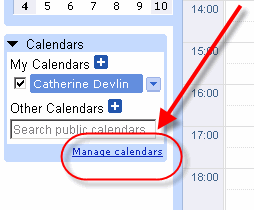
- Log into your Google Calendar account and choose "Manage Calendars".
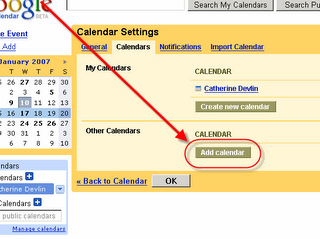
- Click "add calendar"
- Search for "geek event aggregator", then select "Add Calendar".

- Return to your calendar home. Oops, your calendar now looks dense with events. That's because you're seeing an unfiltered list of all events, everywhere. Better un-check "geekEventAggregator".

- Now you can make real use of the Aggregator - search for the city, state, or region of interest. The Aggregator attaches several keywords to each event based on its location.

- Don't take anything the Aggregator reports at face value! Double-check it all. Remember, it's just a poor computer trying to read webpages that were written for humans. It doesn't even attempt to find the time of day, it just declares that everything runs 9-5 Eastern time (who cares if it's in Johannesburg?) I expect to keep gradually improving the accuracy as time goes by.


The Geek Event Aggregator is written in Python (of course!) Behind the scenes, it uses TurboGears and PostgreSQL. (No, you don't see a TG-based web application; the web app generates an annotated version of each scanned webpage, which I can use to troubleshoot the scan; thus, the improved accuracy of this second-generation Aggregator.)
I expect to present a Lightning Talk on it at PyCon 2007 (you are going to PyCon, aren't you?)


